
• (+62721) 702022 (Hunting)
  • [email protected]
  • Youtube
  • Instagram
  • Facebook
  • Alumni
Bahasa IndonesiaID
  • EnglishEN
PENDAFTARAN
  • Beranda
  • Tentang
        • Tentang Teknokrat
          • Sejarah
          • Visi dan Misi
          • Yayasan Pendidikan Teknokrat
          • Rektor UTI
          • Pimpinan Universitas
          • Dosen Teknokrat
          • Profil UTI
          • Kebijakan Privasi
          • Kontak Kami
        • Beasiswa
          • Beasiswa KIP Kuliah
          • Beasiswa Yayasan
        • Kualitas
          • Akreditasi
          • Pusat Penjaminan Mutu
          • e-SPMI
          • Legalitas dan Pengakuan
          • Sistem Manajemen Gedung
        • Kolaborasi & Kemitraan
          • HEI Luar Negeri
          • Industri
          • Pemerintah
          • Kerjasama
          • Karier
        • Unit Penunjang
          • Pusat Inovasi & Kewirausahaan
          • Penelitian dan Pengabdian kepada Masyarakat
          • Pusat Karier & Pelatihan
          • Pusat Pengembangan Mahasiswa
  • Mengapa Teknokrat?
    • Internasionalisasi
    • Jalur Pengembangan Mahasiswa
    • Prestasi
    • Pusat Keunggulan
    • Jalur Karier
    • Komunitas Mahasiswa
    • Fasilitas
    • Peluang Lulusan
    • Alumni
  • Pendaftaran
    • Program Sarjana (S1)
      • Pendaftaran
      • Brosur
      • Kalender Penerimaan
      • Prosedur Penerimaan
      • Persyaratan Pendaftaran
      • Biaya Pendidikan
    • Program Magister (S2)
      • Pendaftaran
      • Brosur
      • Prosedur Penerimaan
      • Biaya Pendidikan
    • Program Internasional
      • Teknokrat Global Connect
  • Program
        • Fakultas Sastra dan Ilmu Pendidikan
          • Pendidikan Bahasa Inggris
          • Pendidikan Matematika
          • Pendidikan Olahraga
          • Sastra Inggris
        • Fakultas Ekonomi dan Bisnis
          • Manajemen
          • Akuntansi
        • Fakultas Teknik dan Ilmu Komputer
          • Sistem Informasi
          • Teknologi Informasi
          • Teknik Elektro
          • Teknik Komputer
          • Teknik Sipil
          • Informatika
        • Program Internasional
          • Teknokrat Global Connect
        • Program Magister
          • Magister Bahasa Inggris (S2)
          • Magister Ilmu Komputer (S2)
  • Berita
  • Layanan
        • Fasilitas Umum
          • Penerbit
          • Perpustakaan
          • Kemahasiswaan
          • Ensiklopedia Teknokrat
          • Kartu Teknokrat
          • Teknokrat Student Park
          • Teknokrat TV
          • Lapor Satgas PPKPT
          • Teknokrat Virtual View
          • Youtube Teknokrat
          • Uji Kompetensi
          • Layanan Disabilitas
        • Layanan Elektronik
          • Online Learning (SPADA)
          • Massive Open Online Courses (MOOCs)
          • Aplikasi e-Parent
          • e-Presensi Ormawa
          • e-Peminjaman
          • e-Certificate
          • e-Quality
          • e-Jurnal
          • Siakad
          • Cyber Security Team
          • Tracer Study
  • Pusat SDGs
  • Jaminan Mutu
PENDAFTARAN
  • EnglishEN
  • Bahasa IndonesiaID
  • Beranda
  • Tentang
    • Tentang Teknokrat
      • Sejarah
      • Visi dan Misi
      • Yayasan Pendidikan Teknokrat
      • Rektor UTI
      • Pimpinan Universitas
      • Dosen Teknokrat
      • Profil UTI
      • Kebijakan Privasi
      • Kontak Kami
    • Beasiswa
      • Beasiswa KIP Kuliah
      • Beasiswa Yayasan
    • Kualitas
      • Akreditasi
      • Pusat Penjaminan Mutu
      • e-SPMI
      • Legalitas dan Pengakuan
      • Sistem Manajemen Gedung
    • Kolaborasi & Kemitraan
      • HEI Luar Negeri
      • Industri
      • Pemerintah
      • Kerjasama
      • Karier
    • Unit Penunjang
      • Pusat Inovasi & Kewirausahaan
      • Penelitian dan Pengabdian kepada Masyarakat
      • Pusat Karier & Pelatihan
      • Pusat Pengembangan Mahasiswa
  • Mengapa Teknokrat?
    • Internasionalisasi
    • Jalur Pengembangan Mahasiswa
    • Prestasi
    • Pusat Keunggulan
    • Jalur Karier
    • Komunitas Mahasiswa
    • Fasilitas
    • Peluang Lulusan
    • Alumni
  • Pendaftaran
    • Program Sarjana (S1)
      • Pendaftaran
      • Brosur
      • Kalender Penerimaan
      • Prosedur Penerimaan
      • Persyaratan Pendaftaran
      • Biaya Pendidikan
    • Program Magister (S2)
      • Pendaftaran
      • Brosur
      • Prosedur Penerimaan
      • Biaya Pendidikan
    • Program Internasional
      • Teknokrat Global Connect
  • Program
    • Fakultas Sastra dan Ilmu Pendidikan
      • Pendidikan Bahasa Inggris
      • Pendidikan Matematika
      • Pendidikan Olahraga
      • Sastra Inggris
    • Fakultas Ekonomi dan Bisnis
      • Manajemen
      • Akuntansi
    • Fakultas Teknik dan Ilmu Komputer
      • Sistem Informasi
      • Teknologi Informasi
      • Teknik Elektro
      • Teknik Komputer
      • Teknik Sipil
      • Informatika
    • Program Internasional
      • Teknokrat Global Connect
    • Program Magister
      • Magister Bahasa Inggris (S2)
      • Magister Ilmu Komputer (S2)
  • Berita
  • Layanan
    • Fasilitas Umum
      • Penerbit
      • Perpustakaan
      • Kemahasiswaan
      • Ensiklopedia Teknokrat
      • Kartu Teknokrat
      • Teknokrat Student Park
      • Teknokrat TV
      • Lapor Satgas PPKPT
      • Teknokrat Virtual View
      • Youtube Teknokrat
      • Uji Kompetensi
      • Layanan Disabilitas
    • Layanan Elektronik
      • Online Learning (SPADA)
      • Massive Open Online Courses (MOOCs)
      • Aplikasi e-Parent
      • e-Presensi Ormawa
      • e-Peminjaman
      • e-Certificate
      • e-Quality
      • e-Jurnal
      • Siakad
      • Cyber Security Team
      • Tracer Study
  • Pusat SDGs
  • Jaminan Mutu
  • Home
  • Komputer
Pengamanan Akun Google

Anticipate Security of Google’s Personal Account from Misuse of Data

  • Posted by
  • Date 25/11/2021
  • Categories Komputer, Teknik

The Importance of Safeguarding Google Accounts Today!

Security of Google Accounts on Google Services in Indonesia has become something that is used by almost all people, especially those who use smartphones. This is because, almost the use of the application requires access by using a google account. Therefore, each person is indirectly asked to create an account on Google services. Reporting from hootsuite (We are Social) regarding the 2021 Digital Report, Indonesia has 345.3 million smartphone users or 125.6% of the total population in Indonesia. With the many uses of social media such as YouTube, WhatsApp, Instagram, Facebook and others.

Although many users are already “literate” in technology, there are still many technology users who are not indifferent to their personal data in the digital world. There are still many people who are only users and take their data security lightly. This can be seen from data from Media Indonesia in mid-2020, which stated that there were around 5,093 complaints related to cyber crimes in Indonesia. These complaints include misuse of data in cases of fraud, insults and other harmful actions. This can actually be avoided or anticipated from our awareness of account security.

Also Read: Augmented Reality is the Form of Future Educational Technology

Dapatkan Informasinya Disini

There are several steps that can be taken in anticipating acts of abuse of the account that we have as a google account security measure. This step can take the form of security by using a password, up to checking the electronic devices connected to our account.

Password Update for Google Account Security

It is undeniable, many of the data users in the digital world still don’t care about the account password they have. That is, Google account security in password management that is still not carried out can cause losses for the account owner. Ideally in creating an account, we must provide a strong password so that it is not easily guessed. A combination of word count, uppercase, lowercase and symbol characters is recommended in creating a strong account.

In addition, it is recommended periodically to update the account password that we have. This is intended to avoid users who “already know” our previous account password from accessing Back. If we have many accounts and the password variations for each account are different, it’s a good idea to make a note of our account so we don’t forget it. However, these records are kept from being easily seen by others.

Google Account Security by Performing 2-Step Verification

Google Accounts already provide various facilities to secure our accounts from data theft and others. The next quite effective way is to activate 2-step verification of our account. Google account security with this 2-step verification can give us a layer of security when trying to access our account. This step can use our smartphone device or use a code.

The steps to enable 2-step verification can be done in the following way;

  1. Open the Google Account that we have on the https://myaccount.google.com page
  2. On the side panel, select Security Menu (Security)
  3. In the “Login to Google” section, select 2-step verification, then select start.
  4. Then follow and fill in the steps that appear on your screen.

Information on Scholarships for Best PTS Education (S1) Sumatra

Get Complete Information: HERE
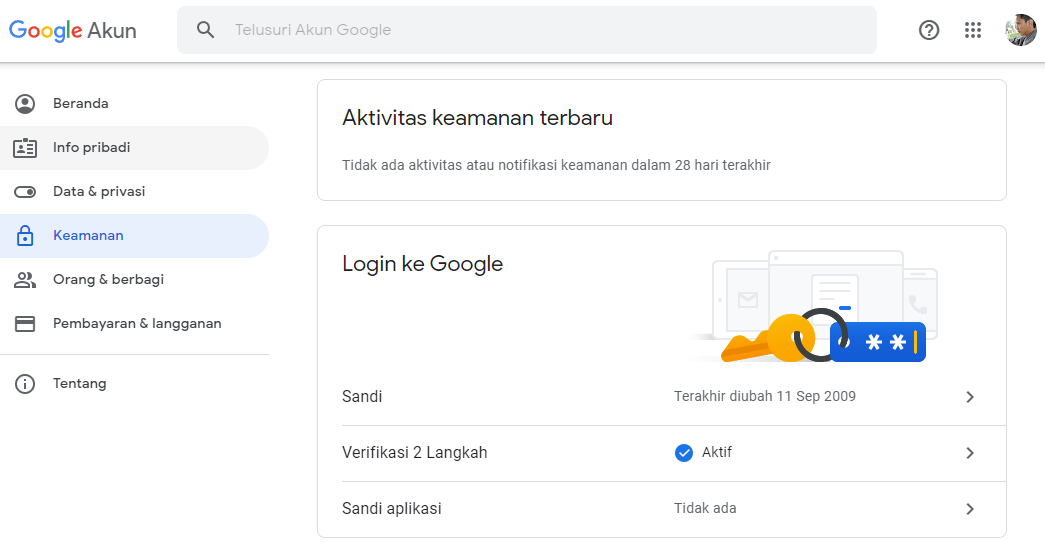
If you use your smartphone device as a 2-step verification medium, be careful about losing your smartphone device. To anticipate this, you can use verification with other methods, such as the use of codes. Or you can add a phone number to receive a 2-step verification confirmation SMS.

Google Account Security with Activity Review and Connected Devices
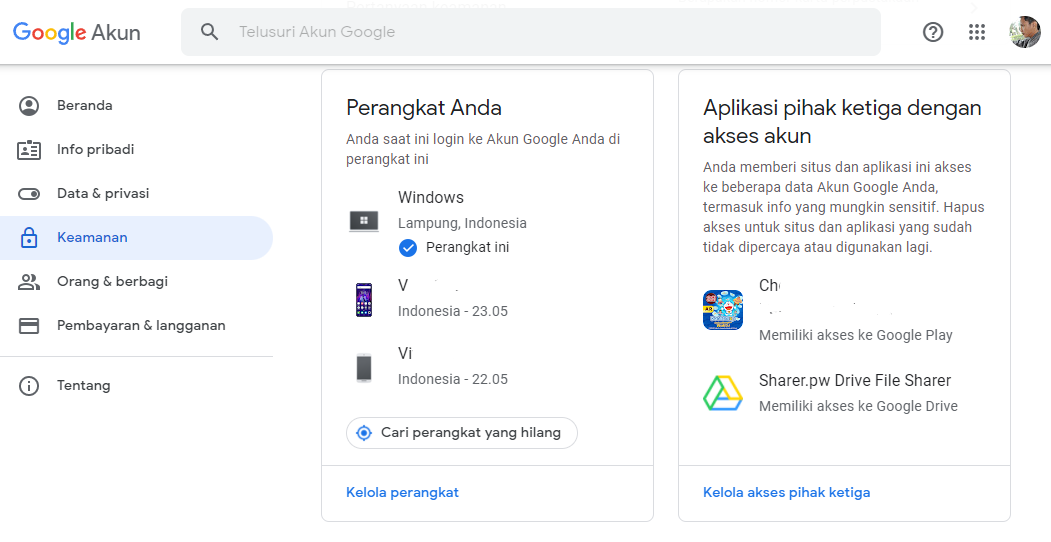
For users who have multiple devices, or change devices frequently. It’s good to check what devices are connected to our google account. That is, the list of connected devices is the device that uses our account. If there is a device that we don’t recognize, someone else can log into our account using that device. We can perform Logout Actions or log out of devices that we do not recognize as a google account security measure. Steps to find out and manage devices connected to our account include:

Steps to find out and manage the devices connected to our account include:

  1. Access google account page.

  1. Select the Security menu.

  1. Select Your Device, then Manage Device.

  1. In device management, we can manage which devices are logged in and logged out.

Make sure we know which devices we have. If you feel there is a list of devices that are not recognized, we can press the three-dot symbol on the device and select logout.

Faculty of Engineering and Computer ScienceUniversitas Teknokrat Indonesia

More Click Here

Google Account Security Manage Apps Installed on Your Device

As with connected devices, we can also check what third-party applications are connected to our google account in an effort to secure our google account. Usually the applications that are visible are the applications that we install from our devices. The application requests access to our device. If we see a list of applications that we have never installed, we better click on the application and Remove Access. It’s also a good idea to pay attention to requests for access permissions from applications that we install on our devices.

More Wise in Using Social Media Is the Key to Google Account Security

We are also expected to be wiser in our digital activities in cyberspace as an effort to secure Google accounts. The role of social media today can become a bad boomerang, if we are not wise in using it. The thing that needs to be reminded regarding data security in social media is not uploading data or photos or information related to our personal data. For example, taking a selfie with an ID card, certificate or the like that displays our core population data.

Also, be careful with the location where we take selfies, such as offices, homes or places where the address is clearly visible. This can later be misused by unscrupulous persons based on your data in the digital world. The most common example encountered is the misuse of loans or online loans. Therefore, it is hoped that we ourselves can be more aware and remind our families to be more aware of our digital account data.


  • Share:
author avatar

Previous post

THE BEST PTS ARCHITECTURE ATHLETES SUMATERA UNIVERSITAS TEKNOKRAT INDONESIA NATIONAL CHAMPION
25/11/2021

Next post

STUDENTS OF THE UNIVERSITAS TEKNOKRAT INDONESIA THE BEST PTS OF SUMATRA NATIONAL CHAMPIONS OF PENCAK SILAT
25/11/2021

Pos-pos Terbaru

  • PEMBEKALAN ASISTEN DOSEN ! Wakil Rektor Teknokrat: Akreditasi Unggul Harus Berdampak Nyata bagi Mahasiswa
  • KEREN !! Universitas Teknokrat Indonesia Kenalkan Teknologi Robotika kepada Siswa SMKS Nusantara Pesawaran, Tiga Robot Berhasil Dirakit
  • HITEKMASI Teknokrat Gelar Team Building Camp, Cetak Mahasiswa yang Unggul dan Berjiwa Kepemimpinan
  • KEREN !! HIMA Akuntansi Universitas Teknokrat Indonesia Gelar Team Building Camp, Perkuat Kepemimpinan dan Solidaritas Mahasiswa
  • MEMBANGGAKAN !! Harumkan Nama Kampus di Tingkat Nasional, Tim Tapis Berseri Universitas Teknokrat Indonesia Raih Juara I Sandi Yudha Competition 2026
  • LUAR BIASA !! Libatkan 41 Organisasi Mahasiswa, Student Fest Technology and Art Expo 2026 Universitas Teknokrat Indonesia Jadi Wadah Pengembangan Potensi Mahasiswa
  • TEMBUS 4 BESAR NASIONAL !! Universitas Teknokrat Indonesia Loloskan 21 Produk Inovasi ke KSTI 2026 Mengungguli Beberapa Kampus Top di Indonesia
  • LUAR BIASA !! Duta Teknokrat 2026 Lahirkan Generasi “Progressive Patriots”, Siap Jadi Pemimpin Muda Berkarakter dan Menginspirasi
  • MENDUNIA !! Rektor Universitas Teknokrat Indonesia Ditetapkan sebagai Chair Professor di Dua Universitas Korea Selatan

Kontak

  • Universitas Teknokrat Indonesia
  • Jl. Zainal Abidin Pagaralam, No.9-11 Labuhan Ratu, Kota Bandar Lampung Provinsi Lampung, 35132
  • (+62721) 702022 (Hunting)
  • +62 822-7992-0145 (Khusus Chat)
  • [email protected]

Unit dan Layanan Pendukung

  • Perpustakaan
  • Kemahasiswaan
  • Penjaminan Mutu
  • Pusat Karier dan Pelatihan
  • Pusat Inkubator Bisnis
  • Satgas PPKPT Teknokrat

Layanan Akademik dan Digital

  • Sistem Informasi Akademik
  • Pembelajaran Daring (SPADA)
  • Uji Kompetensi Berbasis Komputer
  • Jurnal Elektronik
  • e-Parent (Portal Orang Tua Mahasiswa)
  • Sertifikat Elektronik
  • Alumni dan Tracer Study

Penerimaan Mahasiswa Baru

  • Daftar Sekarang
  • Informasi Biaya Kuliah
  • Informasi Beasiswa
Facebook-f Instagram Youtube

Copyright Themes © 2022

Copyright Themes © 2022

Copyright Themes © 2022

Copyright Themes © 2022

Copyright Themes © 2022